I recently redesigned my personal site and set up Umami for privacy-friendly analytics. But like clockwork, the usual issue cropped up: visitors with AdBlock installed drop the tracking script entirely.
AdBlock filter lists target hosted Umami using the third-party rule ||umami.is^$3p, blocking both the tracker script and the telemetry ingest endpoint:
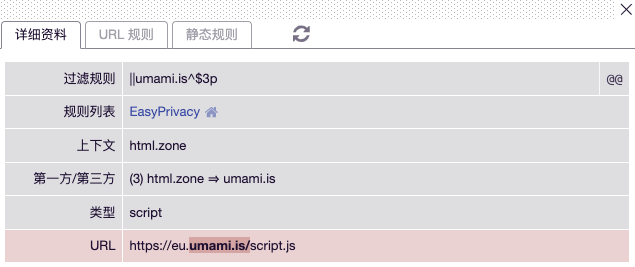
(For background on how ad-block filter lists work, see my previous post on Preventing AdBlock from Blocking Vercel Analytics).
To route around this, you can proxy Umami through your own custom domain using a Cloudflare Worker.
Solution
Create a new Cloudflare Worker and paste in the code below. If you use Umami Cloud, you can leave UMAMI_HOST as-is. If you self-host Umami, you don’t even need a proxy Worker—you can customize the script and collect endpoints directly using the TRACKER_SCRIPT_NAME and COLLECT_API_ENDPOINT environment variables.
const UMAMI_HOST = 'https://eu.umami.is'

export default {
  async fetch(request, env, ctx) {
    const { pathname, search } = new URL(request.url)
    if (pathname.endsWith('.js')) {
      let response = await caches.default.match(request)
      if (!response) {
          response = await fetch(`${UMAMI_HOST}/script.js`, request)
          ctx.waitUntil(caches.default.put(request, response.clone()))
      }
      return response
    }
    const req = new Request(request)
    req.headers.delete("cookie")
    req.headers.append('x-client-ip', req.headers.get('cf-connecting-ip'))
    return fetch(`${UMAMI_HOST}${pathname}${search}`, req)
  },
};
Bind a custom domain to your Worker (mine is https://ums.miantiao.me/mt-demo.js). You can rename mt-demo to any arbitrary filename.
Next, update your site’s embed script (see the Umami tracker configuration docs):
<script defer src="https://ums.miantiao.me/mt-demo.js" data-host-url="https://ums.miantiao.me" data-website-id="0a10de75-03be-4fec-a521-4c62b91650ac"></script>
srcpoints to the proxied JS script.data-host-urlpoints to your proxy domain.data-website-idis your Umami site ID.
You can verify the setup live on mt.ci or on this site.