DNS.Surf originally ran entirely on Vercel, so I used Vercel Analytics for tracking page views. But like with most web analytics tools, visitors with AdBlock installed had their telemetry blocked by default. Here is how to route around the block entirely within Vercel.
AdBlock matches network requests and DOM elements against community filter lists. Vercel Analytics gets blocked by the rule /_vercel/insights/script.js, and filter lists often block /_vercel/insights/event as well:
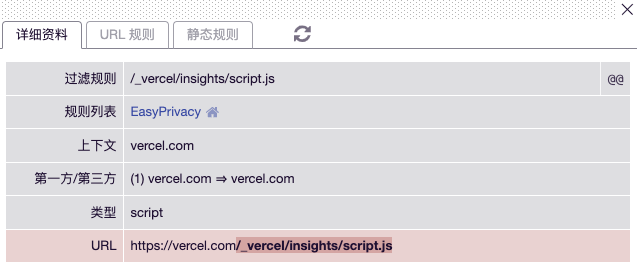
To bypass this, we just need to mask these URLs under a generic path that filter lists won’t flag.
Solution
Vercel provides native path rewriting via vercel.json. You can rewrite an arbitrary path like /mt-demo to /_vercel/insights. Pick any slug that doesn’t collide with existing routes; if filter lists ever catch up, just change the slug.
Add this to vercel.json:
{
  "rewrites": [
    {
      "source": "/mt-demo/:match*",
      "destination": "https://dns.surf/_vercel/insights/:match*"
    }
  ]
}
Note: Use the full absolute URL for destination, or the internal proxy will not resolve properly.
Official Vercel SDK packages like @vercel/analytics do not expose options for overriding the script and ingest URLs. Instead, inject the script manually via plain HTML:
<script>
  window.va = window.va || function () { (window.vaq = window.vaq || []).push(arguments); };
</script>
<script async src="/mt-demo/script.js" data-endpoint="/mt-demo"></script>
srcis the script URL under your custom rewrite prefix.data-endpointis the ingest reporting path. (Undocumented in the official Vercel docs, but fully supported by the script).- Remember to replace
mt-demowith your chosen slug.
You can verify the setup live on DNS.Surf.