After routing around ad-blockers for Vercel Analytics and Umami, I decided to do the same for TempMail.Best, which uses Cloudflare Web Analytics.
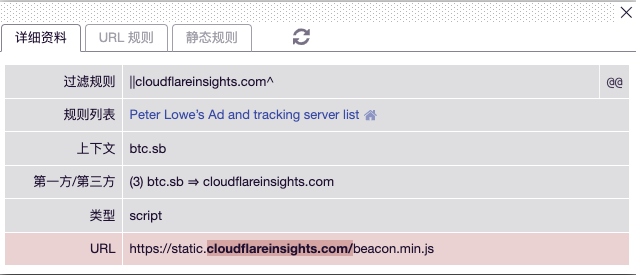
AdBlock catches Cloudflare Web Analytics with the ||cloudflareinsights.com^ rule. The tracker script loads from https://static.cloudflareinsights.com/beacon.min.js, and telemetry is sent to https://cloudflareinsights.com/cdn-cgi/rum.
The fix is identical to what I did for Umami: proxy the JavaScript beacon through your own domain and forward ingest requests to Cloudflare’s endpoint.
Setup
Create a new Cloudflare Worker and paste in the script below. Bind your custom domain and verify the script path (mine is https://cwa.miantiao.me/mt-demo.js). You can rename mt-demo to any path slug you prefer:
const CWA_API = 'https://cloudflareinsights.com/cdn-cgi/rum'
const CWA_SCRIPT = 'https://static.cloudflareinsights.com/beacon.min.js'

export default {
  async fetch(request, env, ctx) {
    let { pathname, search } = new URL(request.url)
    if (pathname.endsWith('.js')) {
      let response = await caches.default.match(request)
      if (!response) {
          response = await fetch(CWA_SCRIPT, request)
          ctx.waitUntil(caches.default.put(request, response.clone()))
      }
      return response
    }
    const req = new Request(request)
    req.headers.delete("cookie")
    const response = await fetch(`${CWA_API}${search}`, req)
    const headers = Object.fromEntries(response.headers.entries())
    if (!response.headers.has('Access-Control-Allow-Origin')) {
      headers['Access-Control-Allow-Origin'] = request.headers.get('Origin') || '*'
    }
    if (!response.headers.has('Access-Control-Allow-Headers')) {
      headers['Access-Control-Allow-Headers'] = 'content-type'
    }
    if (!response.headers.has('Access-Control-Allow-Credentials')) {
      headers['Access-Control-Allow-Credentials'] = 'true'
    }
    return new Response(response.body, {
      status: response.status,
      headers
    })
  },
};
Inject the tracking script into your site’s HTML:
<script async src='https://cwa.miantiao.me/mt-demo.js' data-cf-beacon='{"send":{"to": "https://cwa.miantiao.me/mt-demo"},"token": "5403f4dc926c4e61a757d630b1ec21ad"}'></script>
srcis the script URL on your proxy domain.data-cf-beaconcontains thesend.toingest endpoint, also pointing to your proxy domain.- Remember to replace the
tokenwith your site’s actual token.
You can test this setup live on TempMail.Best or HTML.ZONE.
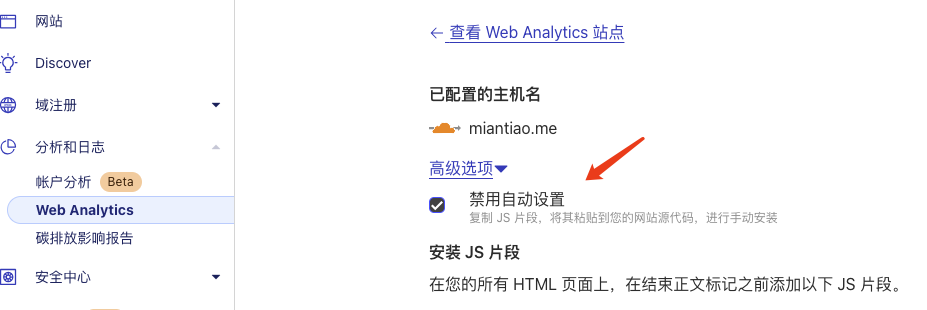
Important: In the Cloudflare dashboard, make sure to disable “Automatic Setup”, or your custom snippet won’t record page views.